Demos Solutions Platform Controls Security Pricing StandardsCompare approachesCustomer accessRequest a demo
Solutions

Start with the work your team repeats.

Pick a task with clear inputs, rules and a person responsible for the outcome. Use an evaluation to compare the total time spent on the task, including review and corrections.

Beyond invoice review: watch Finance and Operations compare a staffing plan.

From document to owner decision

Review the invoice that was actually submitted.

Follow the same file from reading to review. Marcus spots the wrong buyer, rejects the request and asks for a corrected invoice.

Silent demo · captions includedA reviewer rejects the wrong buyer document · 60 seconds
The same request is rejected and processing stops.
Read the transcript

A submitted document names Acme Corporation as buyer, while the reviewer works in Northstar.

Marcus enters the buyer-mismatch reason; the later saved state confirms the decision.

This is a document review, not a payment or mailbox-intake demonstration. Other requests visible in the background are separate cases.

Fictional demonstration. Screenshot walkthrough; saved-record views are labelled.

  1. 00:00:00.000 — One submitted document is read and held for review.
  2. 00:00:07.217 — The same document and run numbers follow it throughout.
  3. 00:00:15.000 — The document names Acme Corporation as the buyer.
  4. 00:00:21.934 — The reviewer works in Northstar.
  5. 00:00:26.462 — The buyer does not match.
  6. 00:00:30.000 — Marcus, the Finance reviewer, enters his rejection reason.
  7. 00:00:37.565 — The filled dialog precedes the saved decision shown next.
  8. 00:00:45.000 — The same request is now rejected. Processing stops.
  9. 00:00:52.650 — This is a document decision. No payment was made.

Download captions (VTT) · Download subtitles (SRT) · Download transcript

Keep Finance moving

Keep the findings and the follow-up together.

When an invoice needs more evidence, give the next person a clear summary of the issue and what is still needed.

From a USD 200 difference to a clear next step.

In this separate workspace example, Sofia asks her agent to review supplied invoice facts. She checks its summary and shares it with Marcus, the CFO. He asks her to obtain the receiving record and freight authorisation before his payment decision.

The shared topic retains their discussion and Sofia’s follow-up.

Watch the Finance conversation · 55 sec →

Fictional supplied-facts discussion. Separate from the submitted-invoice rejection above; no payment is approved or made.

Finance workspace with the saved invoice discussion and Marcus’s recorded next step.
The saved discussion keeps the findings and next step available for follow-up.
Choose a team

Where could an agent help first?

Explore the recorded finance work, HR summary and employee offboarding below. Other examples are starting points to configure and test with your team.

The same questions apply across teams: which method should the agent follow, what information may it use, and who reviews the result?

Finance

Review invoice exceptions

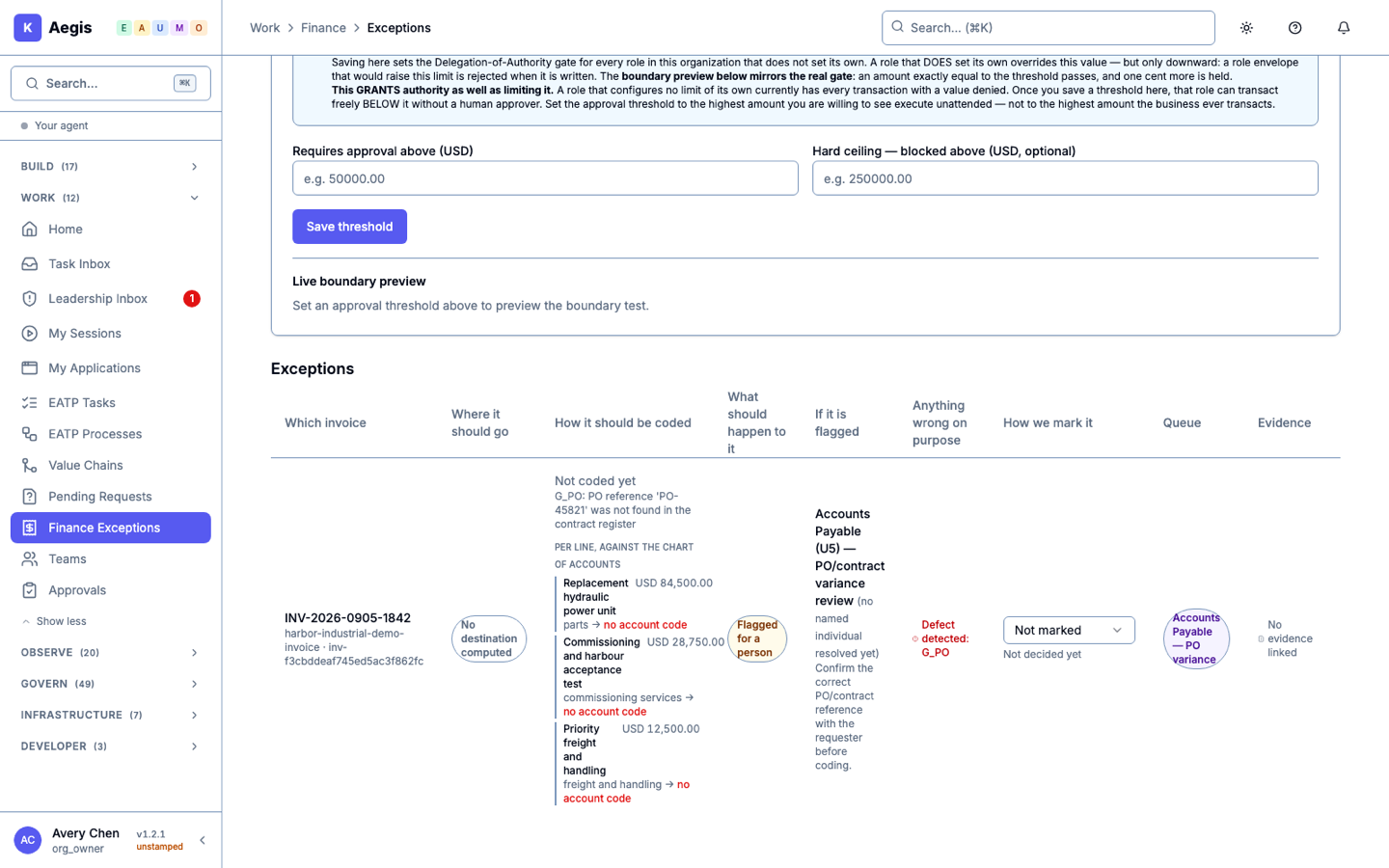
Identify missing purchase-order references, preserve the invoice evidence and prepare a recommendation for review.

A submitted invoice is read and rejected for the wrong buyer. Separate examples show extraction and a missing purchase-order reference. No payment is made.

Watch the example →
IT and security

Prepare an incident handoff

Summarize available incident details, suggest a priority and identify the team that should review it.

An example to evaluate with your ticketing system. The demo library does not establish an end-to-end incident workflow.

Discuss this use case →

Watch the Aegis offboarding example →

Procurement

Review a purchase-order mismatch

Gather the invoice and order references, highlight missing evidence and ask the responsible person to resolve it.

The recorded invoice case shows a missing purchase-order match. Automatic purchasing or supplier approval is not demonstrated.

Inspect the invoice evidence →
Sales operations

Prepare a quote for review

Draft a quote using approved product and pricing information, then route it for the required sign-off.

An example to configure and test with your sales system; no completed quote workflow is shown in the recordings.

Discuss this use case →
Customer operations

Prepare a response to a customer

Use approved guidance to draft a reply and flag questions that need a specialist.

An example to evaluate with your support system. Customer-facing actions need explicit permissions and testing.

Discuss this use case →
Recorded HR example

Know what is ready, what is pending and who follows up.

A shared procedure turns supplied onboarding facts into a handover. A reviewer catches a missing owner label before approving the revised document.

Reviewed handover · Jordan Vale

Case NS-HR-ONB-001 · Start date: 14 September 2026
Exact Ready and Pending sections from Avery’s reviewed editorial revision.

Ready

  • Welcome session: scheduled for 09:30 with Owen Kessler.
  • Laptop allocation: confirmed.

Pending and owner

  • Account activation: pending. Owner: Maya Tan.
  • Security training: not yet booked. Owner: Owen Kessler (owns follow-up).
  • Manager check-in time: not supplied. Owner: not supplied.

Review: Daniel requested the missing-owner label. Avery added “Owner: not supplied.”; Daniel checked and approved that revision. The AI was not run again.

Separate fictional example: one operator used two administrator accounts. This demonstrates document review, not ordinary HR-member access, independent human reviewers or completed onboarding.

Read the original answer and review history

Case and start date

Case NS-HR-ONB-001

New hire: Jordan Vale

Start date: 14 September 2026

Ready

Welcome session: scheduled for 09:30 with Owen Kessler.

Laptop allocation: confirmed.

Pending and owner

Account activation: pending. Owner: Maya Tan.

Security training: not yet booked. Owner: Owen Kessler (owns follow-up).

Manager check-in time: not supplied.

Review boundaries

Daniel Okafor is the requested administrative reviewer of this fictional HR handover; no review decision has yet been recorded. This is a fictional onboarding handover only. Do not claim hiring approval, policy approval, completed onboarding, payroll changes, account activation or completed training. Do not use tools, contact anyone, or change any business record.

Original generated answer, preserved unchanged. “No review decision” describes generation time. Daniel requested the missing-owner label and later approved Avery’s editorial revision. The revised document was not published within Aegis. These are administrative document decisions, not hiring, policy, access, payroll or onboarding approvals.

Discuss an HR task and its review requirements →
HR and IT · fictional example

When someone leaves, review access and responsibility together.

See what changed, what had nothing to change and who supervises the vacant role. Keep a clear record for the people handling the handover.

Explore offboarding with your teamWatch the 46-second example ↓

Priya leaves. Her role stays accountable.

Avery reviews five completed steps and four with nothing to change. Priya’s previous Aegis session is refused in a separate check. Her seat is vacant, with Ethan responsible for supervision until a replacement is appointed.

Silent demo · captions includedReview access when someone leaves · 46 seconds
Fictional Aegis offboarding example. The role remains vacant under supervision; no replacement is appointed.

Use fullscreen for a closer look, or read the story.

Read the story and demo details
  1. Priya is leaving Northstar Operations. This pre-offboarding still shows her active account.
  2. Avery uses the dedicated offboarding flow and records the business reason.
  3. The receipt separates Done from Nothing to do. Five steps completed; four had nothing to change.
  4. The saved role is vacant. The receipt names Ethan as supervisor; no replacement employee was appointed.
  5. Priya is marked deleted. Her existing session was separately verified as rejected after offboarding.

The opening is a seven-second hold of the genuine pre-offboarding directory screenshot. The saved-role view is a separate later capture. The same previously working session was verified as rejected after offboarding; sign-in and credential checks are not included in the film.

The receipt has five Done and four Nothing to do outcomes. Failed and Needs a human outcomes were not exercised in this case. The persisted receipt was checked through the supported API; no history-reopening screen is shown.

This demonstrates selected Aegis access changes, not external SaaS account revocation or a completed HR termination. The retained directory card is marked deleted. Supervision is not a new appointment or proof that a subsequent agent task ran. Native environment badges remain visible.

Fictional organisation, people and records. Captured in the local application on 28 September 2026, with an automated operator using the named accounts. Cuts shorten navigation and exclude sign-in. This recording does not establish production availability or mobile-app support.

Download captions (VTT) · Download subtitles (SRT) · Download transcript

The finance example

Earlier analysis and finance examples.

Inspect a separate invoice-analysis run and the decisions around its plan. The submitted-document example above shows the actual owner rejection.

Earlier invoice analysis and original recording

See the earlier invoice conversation: a request, questions about missing evidence, approval of analysis and a recommendation.

Review an invoice mismatch · 45 seconds
The assistant asks for missing evidence, proposes steps for a person to review, then returns its analysis after approval. Its answer recommends human follow-up; approving the analysis does not approve payment.

Download the original recording or read its transcript

The assistant asks for missing evidence, proposes steps for a person to review, then returns its analysis after approval. Its answer recommends human follow-up; approving the analysis does not approve payment.

  1. 00:00:00 — A person asks Aegis to review a problem with a supplier invoice.
  2. 00:00:12 — Aegis asks for missing evidence before suggesting a review plan.
  3. 00:00:22 — The person approves a review plan. This does not approve a payment.
  4. 00:00:32 — The AI explains the amount difference and recommends follow-up by a person.
  5. 00:00:39 — Missing evidence and next steps stay visible for the payments manager.

Download captions (VTT)

Download the original recording (embedded English remains).

The answer completed. This run reports that its action records were not cryptographically verified (checked for authenticity).

Aegis can read a submitted invoice and send that request for review. Give the agent the procedure, permissions and review rules for the job. The submitted-document walkthrough above follows one file through the owner’s decision.

How upload, email and connected systems differ
  • Direct submission. The demonstrated route receives the file itself, reads it and holds the same request for a reviewer. It does not accept a file URL. The separate extraction-upload route reads fields; starting configured work afterwards is another explicit step.
  • Email. Email and connected mailbox intake are not configured or demonstrated in this package. Microsoft and Google mailbox knowledge sync does not establish an email-to-invoice workflow.
  • Connected systems. The connected-data walkthrough shows an agent reading a public REST source. It does not show a system sending an invoice into Aegis or an outgoing notification starting new work.

See an assigned invoice procedure shape an answer. Assigning the procedure is separate from choosing how the invoice arrives. A separate text upload creates a draft reference, not an invoice case.

Keep the decision clear. The analysis plan can be approved without authorizing payment. The Northstar document walkthrough follows one submitted invoice through a rejection recorded by the demo operator using the CFO account. The earlier simulated limit check remains a separately labelled example.

Watch the CFO review →
Choose the right level of oversight

Decide what the agent can do on its own.

Some work should stay advisory. Other tasks can run within approved limits, with exceptions brought to a person. The right choice depends on the task’s risk.

Inspect the evidence

Read the source. Check the issue. Make the decision.

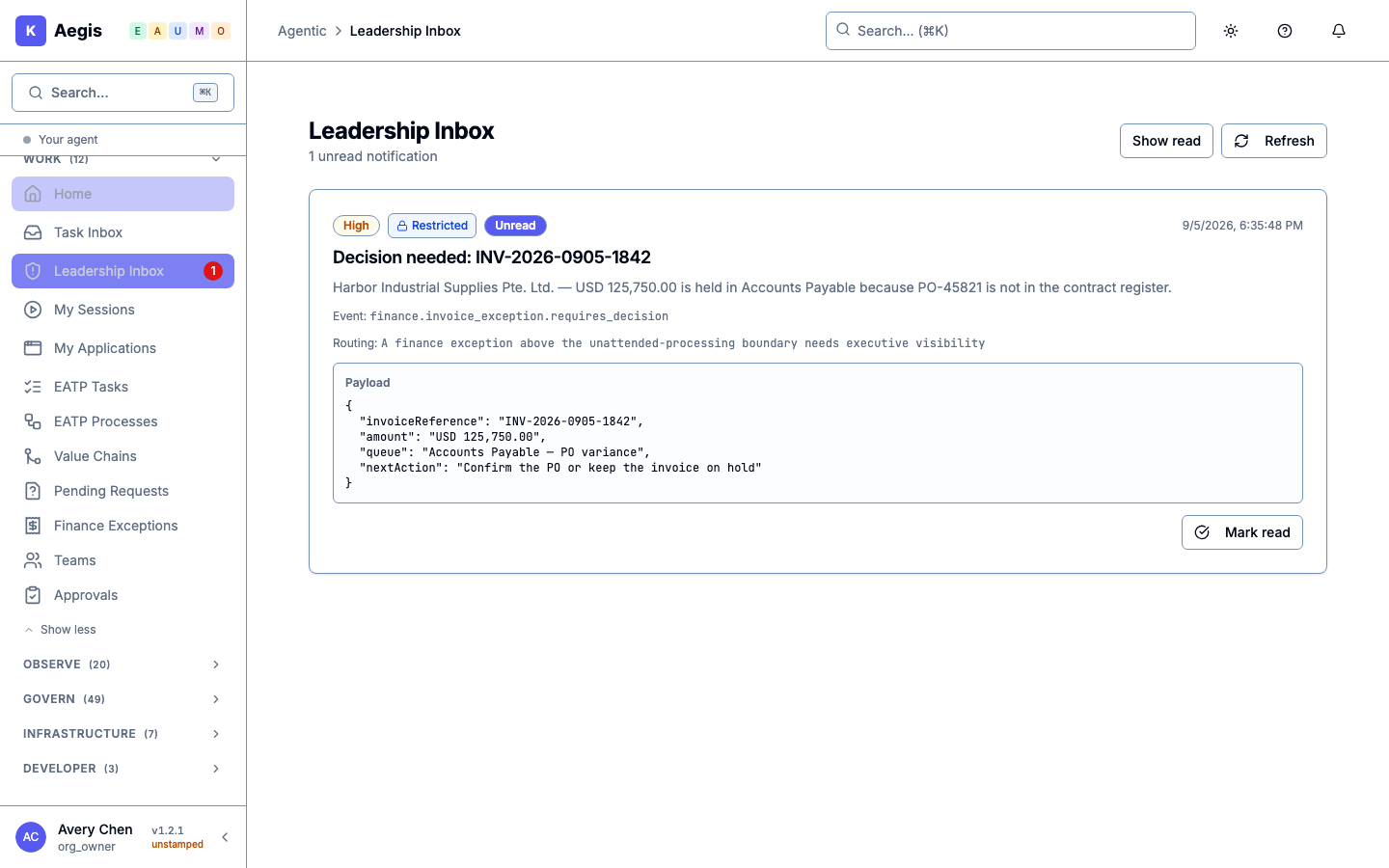
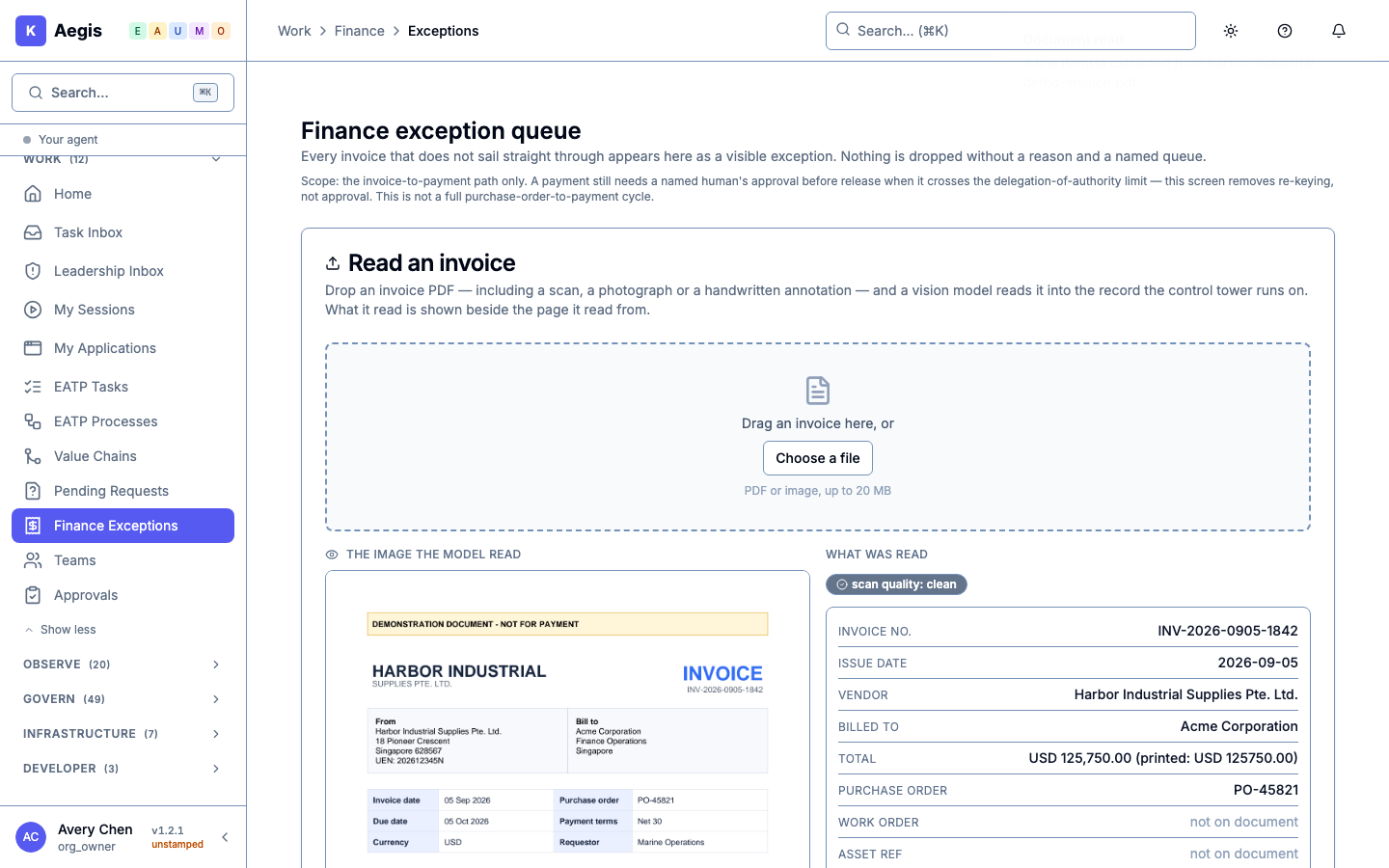
These captures show the invoice and the saved exception. The leadership notice was linked manually and is a notification, not an approval screen.

Aegis extracts the supplier, amount, purchase-order number and three line items.
The purchase-order reference could not be matched. The saved case keeps the reason and line items.
Leadership sees a concise notice. Decisions requiring sign-off belong in the separate Approvals screen.
Make the pilot measurable

Agree what success would look like.

Time saved

Measure today’s handling time, including checking and corrections. Compare it with the same work using Aegis.

Quality of the work

Check missing evidence, wrong answers and exceptions. Include the time people spend reviewing the agent’s output.

Cost and control

Include software, AI usage, integration and support. Test approval rules, data access and how to stop work.

What would you give your first agent?

Choose one team and one recurring task. We’ll walk through the work, the controls and the setup it needs.